> ## Documentation Index
> Fetch the complete documentation index at: https://cal.com/help/llms.txt
> Use this file to discover all available pages before exploring further.
# Cal.Video Location: Advanced Settings
When you pick [**Cal.Video**](http://Cal.Video) as the location for an event type, you can reveal extra configuration options by selecting **Show advanced settings**. These controls let you manage recording, transcription, guest permissions, and the post-call experience.
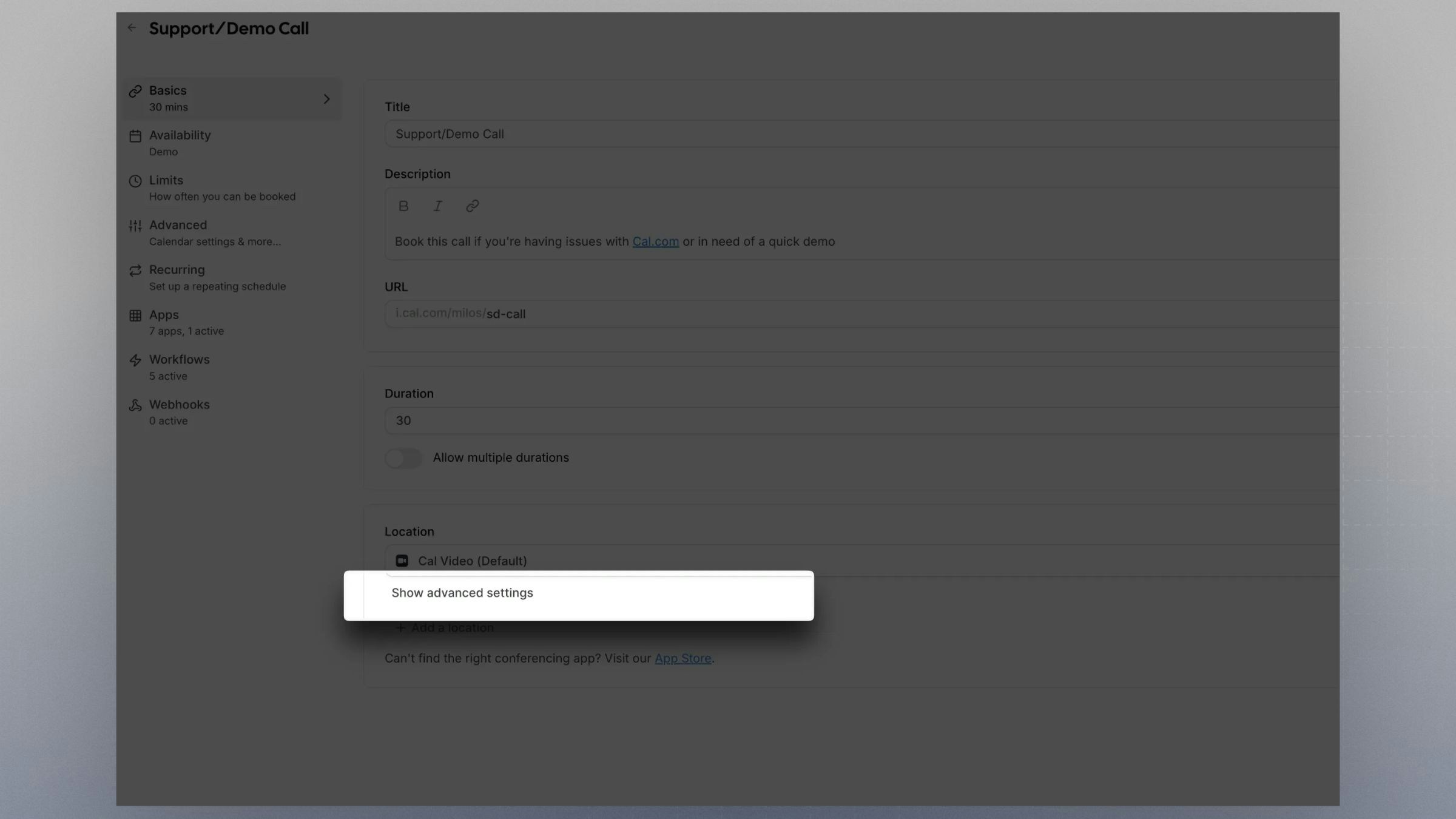 Once you select CalVideo for your Event Type, you can access these settings by clicking on "Show advanced settings" below the dropdown.
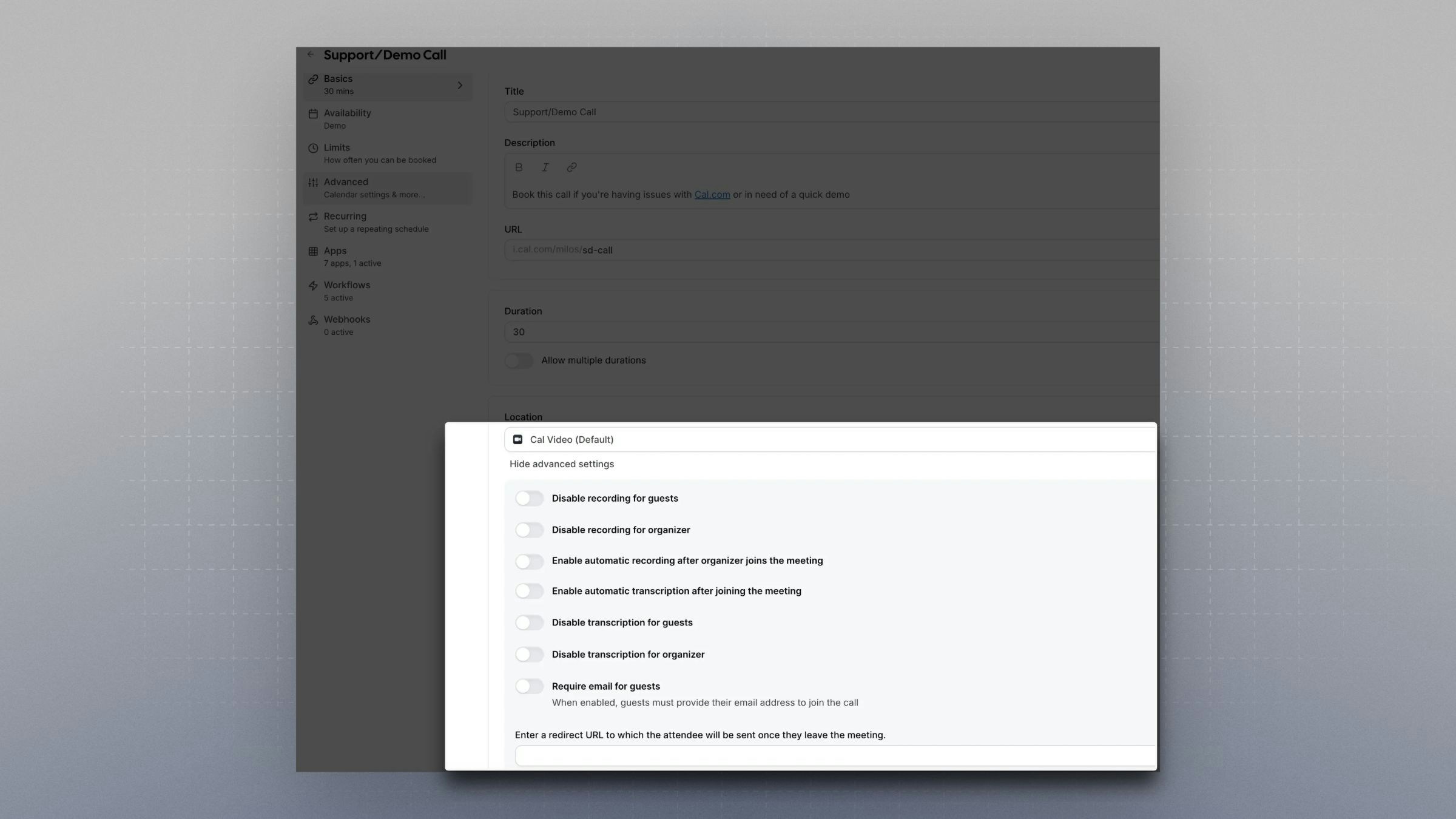 ## Recording
### Disable recording for guests
Prevents the guest from starting a recording inside the meeting.
### Disable recording for organizer
Blocks organizers from starting a recording.\
Useful for teams where only the owner should control recordings.
### Automatic recording
Starts recording automatically as soon as the organizer joins the room.\
This removes the need for any manual action.
Organization admins can disable Cal Video recording download emails for all attendees across the organization. This setting is found under **Organization Settings → Guest notifications**. When enabled, attendees will not receive recording download links, but organizers will still get their recording emails.
### Viewing recordings on cal.eu
On the EU region (`cal.eu`), the **View recordings** action is available on any past, confirmed Cal Video booking, even if Cal.com did not detect a recording file for that meeting. This lets organizers open the recordings dialog and check whether a recording is available whenever they suspect one exists.
On `cal.com` and other regions, **View recordings** is only enabled when a recording was captured for the booking.
## Transcription
### Transcription on join
Enables transcription automatically after the organizer enters the call.
### Disable transcription for guests
Guests cannot turn transcription on.
### Disable transcription for organizer
Stops organizers from enabling transcription when this must be controlled manually.
### Guest Access
**Require email to join**
Guests must provide an email address before entering the call.\
This works as a simple verification step.
### Post-Call Behavior
**Redirect URL**
Send participants to any URL after the meeting ends.\
Common use cases include thank you pages, surveys, or onboarding flows.
## Recording
### Disable recording for guests
Prevents the guest from starting a recording inside the meeting.
### Disable recording for organizer
Blocks organizers from starting a recording.\
Useful for teams where only the owner should control recordings.
### Automatic recording
Starts recording automatically as soon as the organizer joins the room.\
This removes the need for any manual action.
Organization admins can disable Cal Video recording download emails for all attendees across the organization. This setting is found under **Organization Settings → Guest notifications**. When enabled, attendees will not receive recording download links, but organizers will still get their recording emails.
### Viewing recordings on cal.eu
On the EU region (`cal.eu`), the **View recordings** action is available on any past, confirmed Cal Video booking, even if Cal.com did not detect a recording file for that meeting. This lets organizers open the recordings dialog and check whether a recording is available whenever they suspect one exists.
On `cal.com` and other regions, **View recordings** is only enabled when a recording was captured for the booking.
## Transcription
### Transcription on join
Enables transcription automatically after the organizer enters the call.
### Disable transcription for guests
Guests cannot turn transcription on.
### Disable transcription for organizer
Stops organizers from enabling transcription when this must be controlled manually.
### Guest Access
**Require email to join**
Guests must provide an email address before entering the call.\
This works as a simple verification step.
### Post-Call Behavior
**Redirect URL**
Send participants to any URL after the meeting ends.\
Common use cases include thank you pages, surveys, or onboarding flows.