> ## Documentation Index
> Fetch the complete documentation index at: https://cal.com/help/llms.txt
> Use this file to discover all available pages before exploring further.
# Event buffers
> Learn how event buffers block time before and after meetings to prevent back-to-back bookings.
Event buffers are a great way to maintain a breathing space between multiple events in a day. Buffers are taken into consideration while booking a Cal event, if that Cal event has a buffer time selected. This simply means that buffers cannot overlap Cal events and thus a Cal event with buffer time can only be booked respecting the buffer time (before event, after event or both).
Event buffers automatically block time **before and/or after your meetings** so you don't get booked back-to-back.
You can configure buffers per event type. For example:
* Add buffer **before meetings** to prepare
* Add buffer **after meetings** to take notes, travel, or follow up
When buffers are enabled, Cal.com treats that extra time as **busy**, so new bookings cannot overlap it.
## How buffers work
Every meeting creates a **protected time window** around it.
```text theme={null}
| buffer before | meeting time | buffer after |
```
Other meetings cannot be scheduled inside this protected window.
## Buffers can stack
When someone tries to book a new meeting near an existing one, Cal.com considers:
* Buffers of the **existing meeting**
* Buffers of the **new meeting being scheduled**
This ensures **both meetings get the space they require**.
This is why you may sometimes see **more time blocked than the buffer value itself**.
## Example scenarios
The following examples use these assumptions:
* Working hours: 8:00 AM - 5:00 PM
* Meeting duration: 60 minutes
* Existing meeting: **10:00 AM - 12:00 PM**
### Scenario 1: Only buffer before meetings (60 min)
**Settings**
* Buffer before: 60 minutes
* Buffer after: 0
**Blocked timeline**
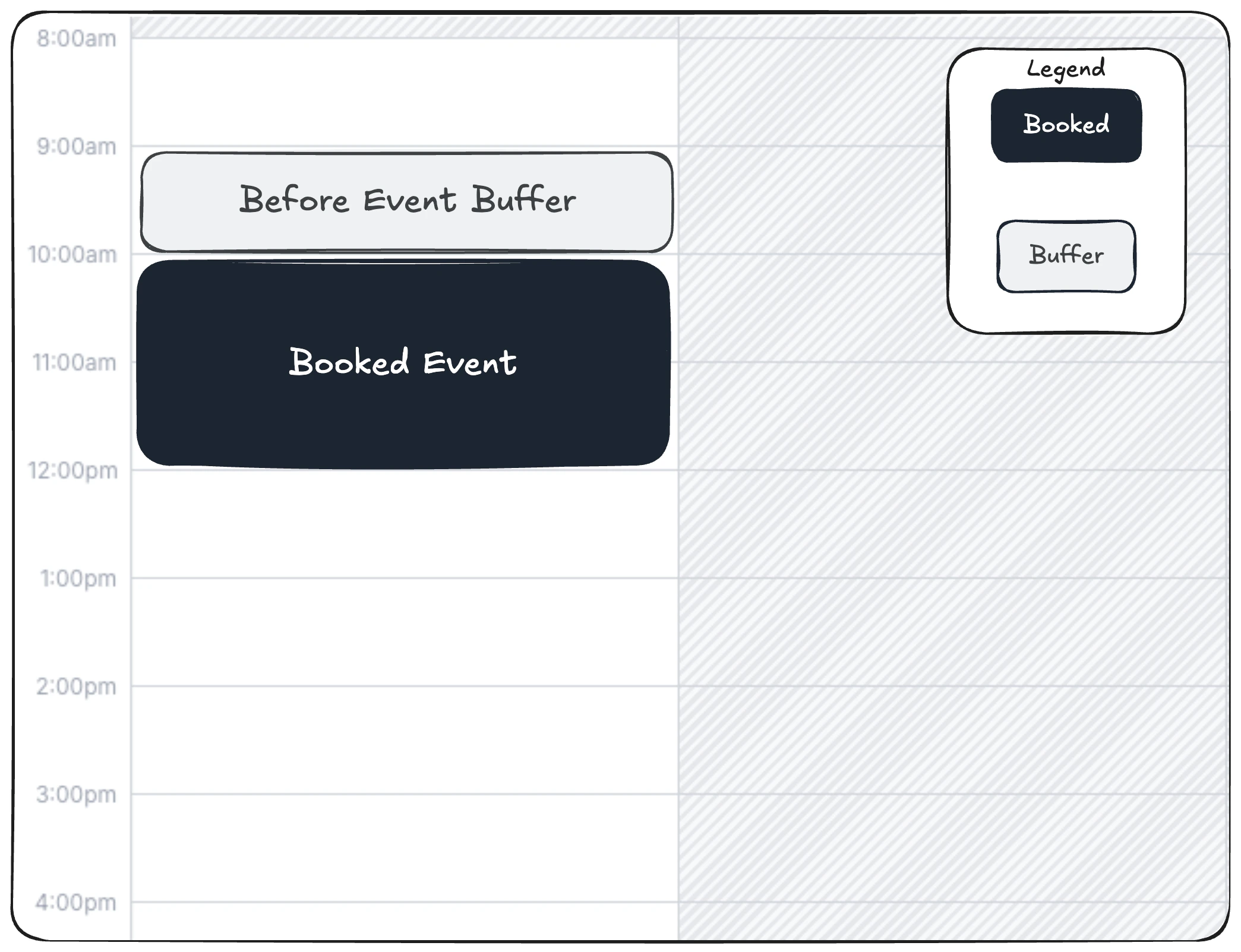 **Effective blocked window:** 09:00 AM - 01:00 PM, 09-00 AM to 10:00 AM for before event buffer of the booked event, and 12:00 PM - 01:00 PM for the subsequent event that might be booked
**Next available slot:** 01:00 PM because of before event buffer needed for any new events
A meeting starting at 10:00 AM would need 60 minutes before it, which overlaps the existing booking.
### Scenario 2: Only buffer after meetings (60 min)
**Settings**
* Buffer before: 0
* Buffer after: 60 minutes
**Blocked timeline**
**Effective blocked window:** 09:00 AM - 01:00 PM, 09-00 AM to 10:00 AM for before event buffer of the booked event, and 12:00 PM - 01:00 PM for the subsequent event that might be booked
**Next available slot:** 01:00 PM because of before event buffer needed for any new events
A meeting starting at 10:00 AM would need 60 minutes before it, which overlaps the existing booking.
### Scenario 2: Only buffer after meetings (60 min)
**Settings**
* Buffer before: 0
* Buffer after: 60 minutes
**Blocked timeline**
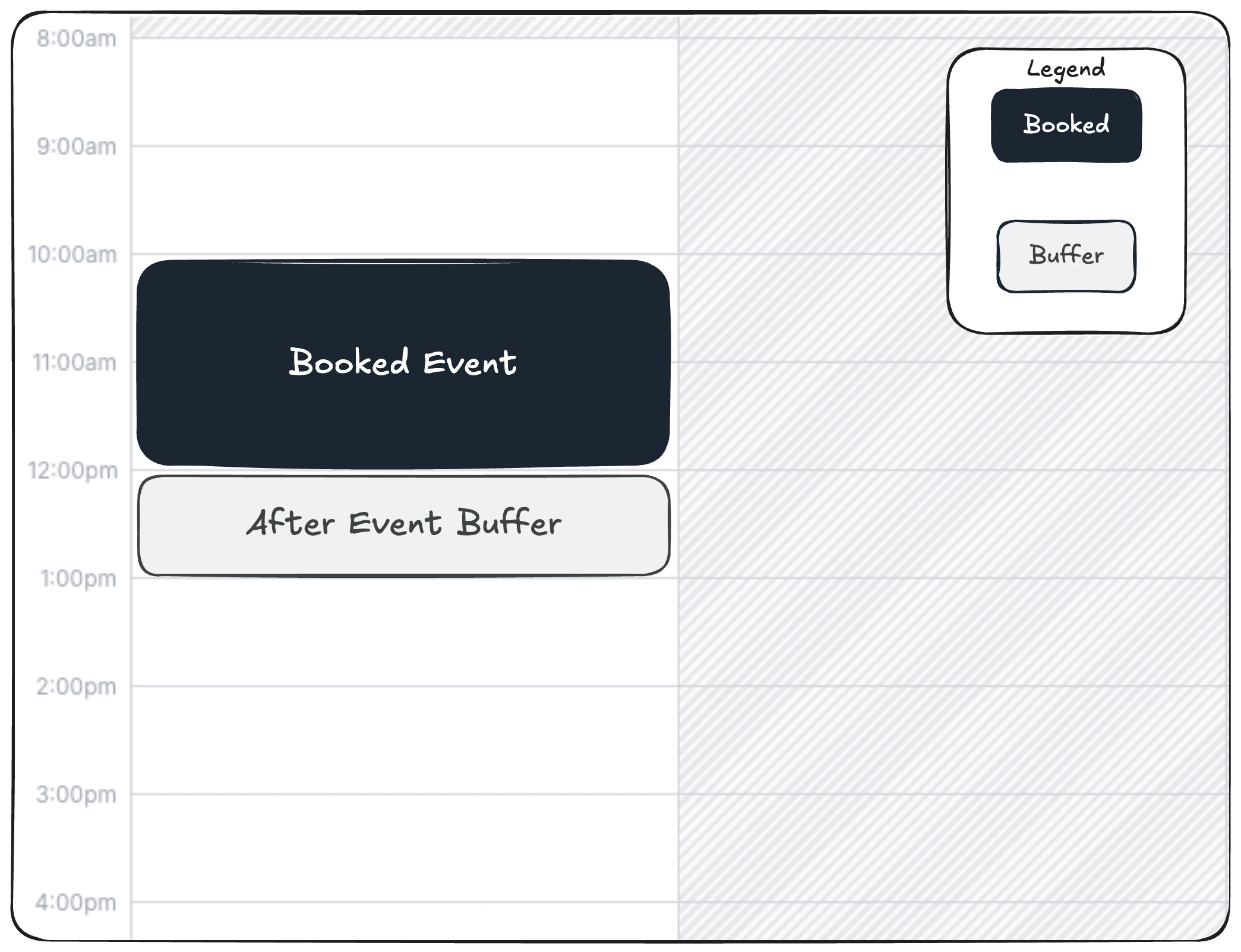 **Effective blocked window:** 10:00 AM - 01:00 PM
**Next available slot:** 01:00 PM
A meeting ending at 12:00 PM would need 60 minutes after it, which overlaps the existing booking.
### Scenario 3: Buffer before and after (30 min each)
The planned event is from 10:00 AM - 11:00 AM
**Settings**
* Buffer before: 30 minutes
* Buffer after: 30 minutes
**Blocked timeline**
**Effective blocked window:** 10:00 AM - 01:00 PM
**Next available slot:** 01:00 PM
A meeting ending at 12:00 PM would need 60 minutes after it, which overlaps the existing booking.
### Scenario 3: Buffer before and after (30 min each)
The planned event is from 10:00 AM - 11:00 AM
**Settings**
* Buffer before: 30 minutes
* Buffer after: 30 minutes
**Blocked timeline**
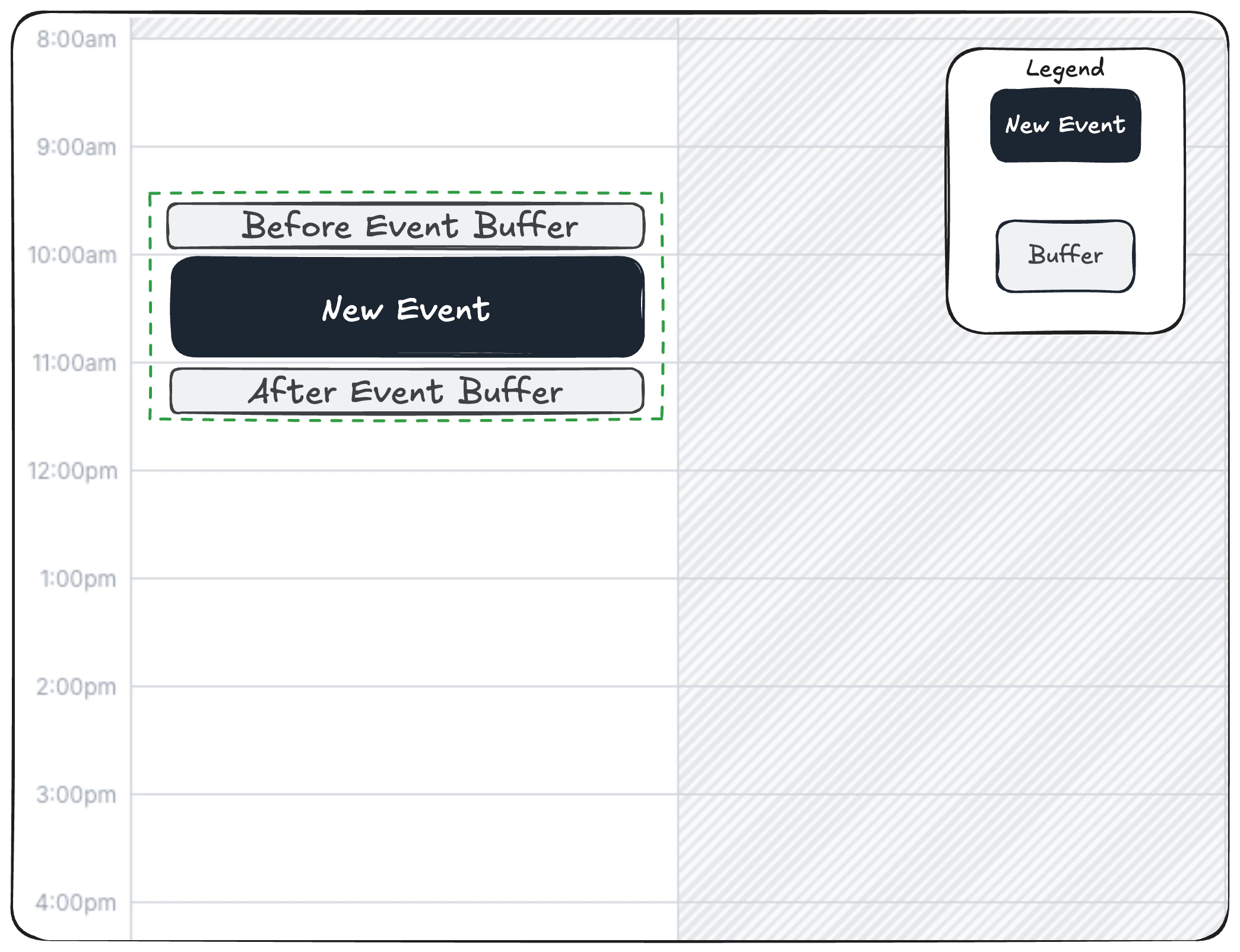 **Effective blocked window:** 09:30 AM - 12:00 PM
A single 1-hour meeting blocks 2.5 hours total.
**Next available slot:** 12:00 PM
### Scenario 4: Behavior of new event when not enough buffer space is provided
The booked event is from 10:00 AM - 11:00 AM. A new event is attempted to be scheduled at 11:45 AM - 12:45 PM.
**Settings**
* Buffer before: 30 minutes
* Buffer after: 30 minutes
**Blocked timeline**
**Effective blocked window:** 09:30 AM - 12:00 PM
A single 1-hour meeting blocks 2.5 hours total.
**Next available slot:** 12:00 PM
### Scenario 4: Behavior of new event when not enough buffer space is provided
The booked event is from 10:00 AM - 11:00 AM. A new event is attempted to be scheduled at 11:45 AM - 12:45 PM.
**Settings**
* Buffer before: 30 minutes
* Buffer after: 30 minutes
**Blocked timeline**
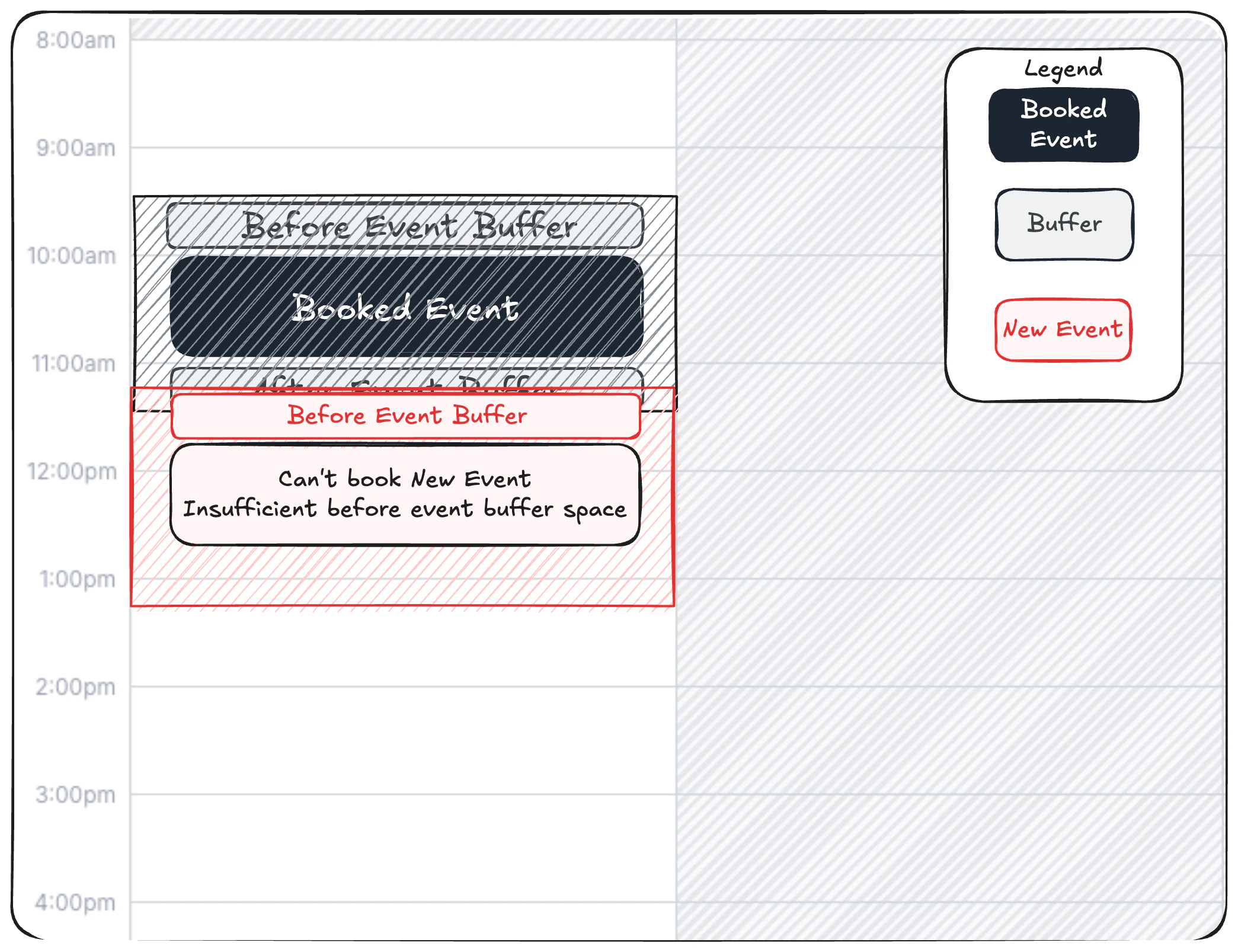 **Effective blocked window:** 09:30 AM - 12:00 PM
**Reason for failure:** This time does not allow enough pre-event buffer for the new meeting.\
Buffers from existing bookings also apply, so the 11:00–11:30 AM window is reserved as post-event buffer and cannot be used as pre-event buffer.
**Next available slot:** 12:00 PM
### Scenario 5: Behavior of new event when enough buffer space is provided
The booked event is from 10:00 AM - 11:00 AM. A new event is attempted to be scheduled at 12:00 PM - 01:00 PM.
**Settings**
* Buffer before: 30 minutes
* Buffer after: 30 minutes
**Blocked timeline**
**Effective blocked window:** 09:30 AM - 12:00 PM
**Reason for failure:** This time does not allow enough pre-event buffer for the new meeting.\
Buffers from existing bookings also apply, so the 11:00–11:30 AM window is reserved as post-event buffer and cannot be used as pre-event buffer.
**Next available slot:** 12:00 PM
### Scenario 5: Behavior of new event when enough buffer space is provided
The booked event is from 10:00 AM - 11:00 AM. A new event is attempted to be scheduled at 12:00 PM - 01:00 PM.
**Settings**
* Buffer before: 30 minutes
* Buffer after: 30 minutes
**Blocked timeline**
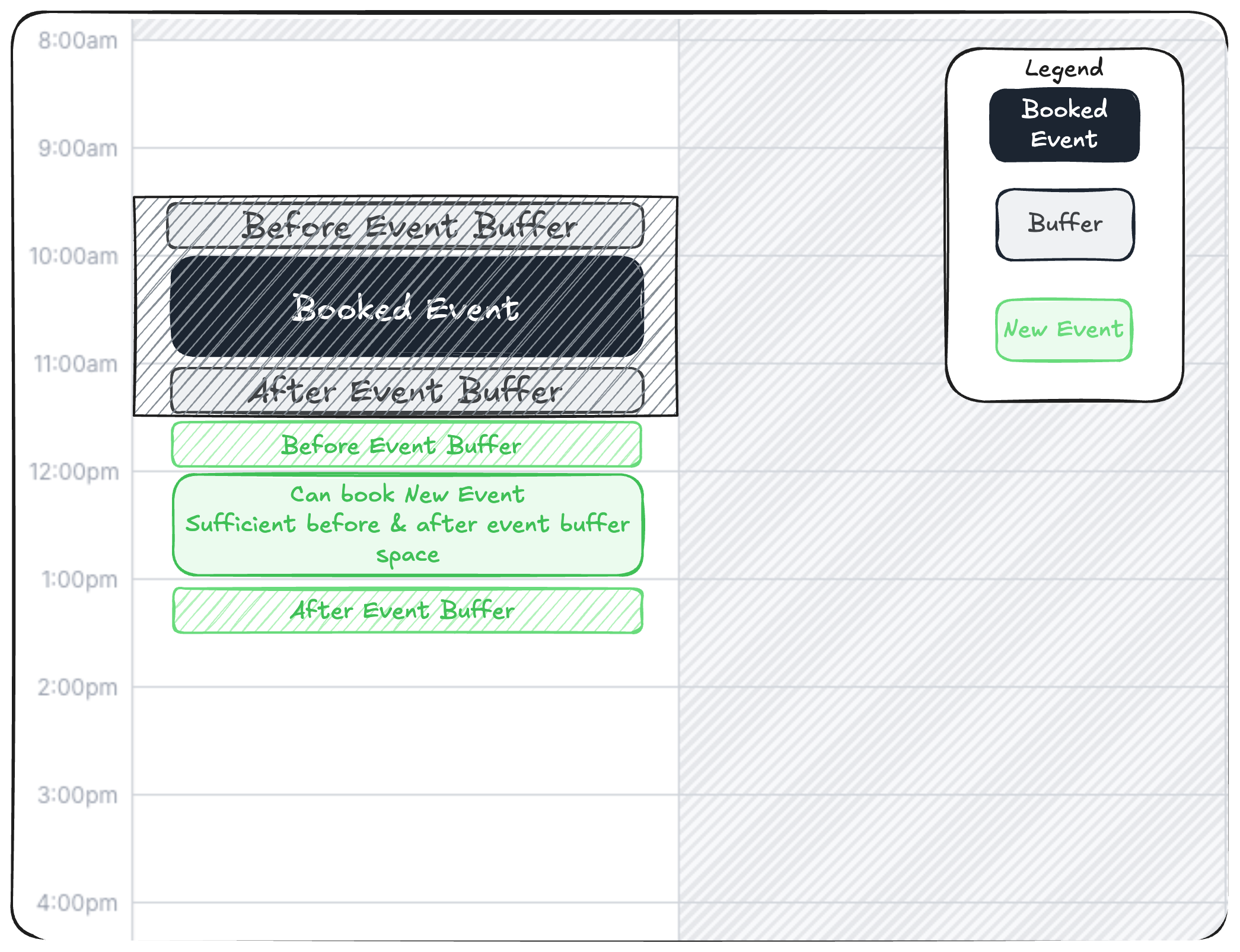 **Effective blocked window:** 09:30 AM - 12:00 PM
**Reason for success:** This time provides enough pre-event buffer for the new meeting.\
Buffers from existing bookings are also respected — the 11:00–11:30 AM window remains reserved as post-event buffer, while 11:30 AM–12:00 PM is available to satisfy the required pre-event buffer.
**Next available slot:** 12:00 PM
## External calendar events (Google, Outlook, etc.)
Buffers also apply to events from connected calendars.
However, external meetings only use the **buffer settings of the event type being booked** because external events do not have Cal.com buffer settings.
## Large buffer example
If you configure:
* Meeting duration: 2 hours
* Buffer before: 2 hours
* Buffer after: 2 hours
Then a single meeting can block:
```text theme={null}
|---- 2h buffer ----|==== 2h meeting ====|---- 2h buffer ----|
```
Total blocked time = **6 hours**. This is expected behavior.
Please note that buffers stack for multiple events.
For example, Existing booking 10:00–11:00 AM, event type has `afterBuffer=30, beforeBuffer=15`:
* After the booking: blocked until 11:45 AM (30 + 15)
* Before the booking: blocked from 9:15 AM (15 + 30)
* Next available slot for a 60-min event: 11:45 AM
## Why Cal.com works this way
This prevents real-world scheduling problems like:
* Back-to-back fatigue
* Travel conflicts
* Prep time being ignored
* Overlapping expectations between different event types
It ensures **more realistic availability**.
## Tips for choosing buffer settings
**Use smaller buffers (5-15 min)** if you:
* Run high-volume short calls
* Want maximum availability
**Use larger buffers (30-60+ min)** if you:
* Need prep or recovery time
* Travel between meetings
* Run workshops or deep sessions
## Common question
Because buffers from the existing meeting **and** the new meeting can combine. This is intentional to guarantee both meetings have the space they require.
**Effective blocked window:** 09:30 AM - 12:00 PM
**Reason for success:** This time provides enough pre-event buffer for the new meeting.\
Buffers from existing bookings are also respected — the 11:00–11:30 AM window remains reserved as post-event buffer, while 11:30 AM–12:00 PM is available to satisfy the required pre-event buffer.
**Next available slot:** 12:00 PM
## External calendar events (Google, Outlook, etc.)
Buffers also apply to events from connected calendars.
However, external meetings only use the **buffer settings of the event type being booked** because external events do not have Cal.com buffer settings.
## Large buffer example
If you configure:
* Meeting duration: 2 hours
* Buffer before: 2 hours
* Buffer after: 2 hours
Then a single meeting can block:
```text theme={null}
|---- 2h buffer ----|==== 2h meeting ====|---- 2h buffer ----|
```
Total blocked time = **6 hours**. This is expected behavior.
Please note that buffers stack for multiple events.
For example, Existing booking 10:00–11:00 AM, event type has `afterBuffer=30, beforeBuffer=15`:
* After the booking: blocked until 11:45 AM (30 + 15)
* Before the booking: blocked from 9:15 AM (15 + 30)
* Next available slot for a 60-min event: 11:45 AM
## Why Cal.com works this way
This prevents real-world scheduling problems like:
* Back-to-back fatigue
* Travel conflicts
* Prep time being ignored
* Overlapping expectations between different event types
It ensures **more realistic availability**.
## Tips for choosing buffer settings
**Use smaller buffers (5-15 min)** if you:
* Run high-volume short calls
* Want maximum availability
**Use larger buffers (30-60+ min)** if you:
* Need prep or recovery time
* Travel between meetings
* Run workshops or deep sessions
## Common question
Because buffers from the existing meeting **and** the new meeting can combine. This is intentional to guarantee both meetings have the space they require.